
Fix Your Livestream Plumbing: Set Up Subsplash Streaming Correctly
 Reed VerdesotoDigital Systems Architect
TL;DR: When your church livestream keeps breaking, start by checking how the whole system is connected and configured. Think of it like plumbing: every connection must carry the flow the next part expects. Trace the video and audio paths, verify the final encoder output against Subsplash’s live settings, and check your broadcast schedule and syndication. A running encoder does not automatically mean your audience can watch.
Your camera is on. Your encoder says it is streaming. Someone messages the booth: “We can’t see anything on YouTube.”
It is tempting to assume Subsplash is the problem. In my experience helping churches, the more useful first move is to inspect the setup and find the handoff where things stop working.
A widespread incident changes that investigation. Check Subsplash’s system status when trouble starts. But a clear status page does not prove your particular connection is healthy, and a problem affecting one church can still require platform support. Follow the evidence.
Think of your signal chain like plumbing
Water has to travel through a connected system. You can have a working faucet and still have a blockage farther along the pipe.
Streaming works much the same way. A camera can produce a good picture while the switcher sends a format the next device cannot accept. The encoder can show a healthy local preview while its outbound connection struggles. Subsplash can receive video while the YouTube broadcast is still waiting to start.
The whole system matters. For the broader audience journey, review the three doors to your church’s digital house.
Here is a common arrangement:
Video: cameras → switcher or capture device → production computer, if used → encoder.
Audio: microphones and other sources → mixer → the point where audio joins video → encoder.
Distribution: encoder → network and internet connection → Subsplash → your app, website, and enabled syndication destinations.
Your equipment may combine several of those jobs. A production computer might also be the encoder. A hardware encoder might receive the switcher output directly. Draw the path you actually use rather than copying someone else’s diagram.
Compatible connections matter more than identical numbers
The plumbing comparison is about compatible connections and enough capacity. Digital video does not have literal water pressure.
You do not need every device to use identical settings. You might capture in 4K and deliberately produce a 1080p broadcast. A device that supports the conversion can make that work.
What you need to avoid is an accidental mismatch. Check what each device sends and what the next device accepts. Pay attention to resolution, frame rate, supported input formats, and any conversion taking place. Treat 29.97 and 30 fps as distinct choices when configuring equipment.
Check audio separately: routing, supported sample rates, levels, clipping, and synchronization. Not every crackle or distorted picture is an encoding problem. Locate the first point where the symptom appears.
The final encoder output is your critical checkpoint
The settings on your camera do not tell you what Subsplash receives.
Find the encoder output that actually feeds Subsplash. If a cloud service sits between your building and Subsplash, inspect that service’s outgoing feed too. An upstream preset does not guarantee the final output is configured correctly.
Use the connection method supported by your particular Subsplash setup and encoder. Do not assume RTMP and SRT are interchangeable or that a protocol is supported simply because your equipment offers it.
Subsplash Live encoding settings
Subsplash publishes separate live profiles for 720p and 1080p. The reference below reproduces the factual settings from its Subsplash Live table, checked November 2, 2026. Use that section of the documentation rather than the separate on-demand upload settings.
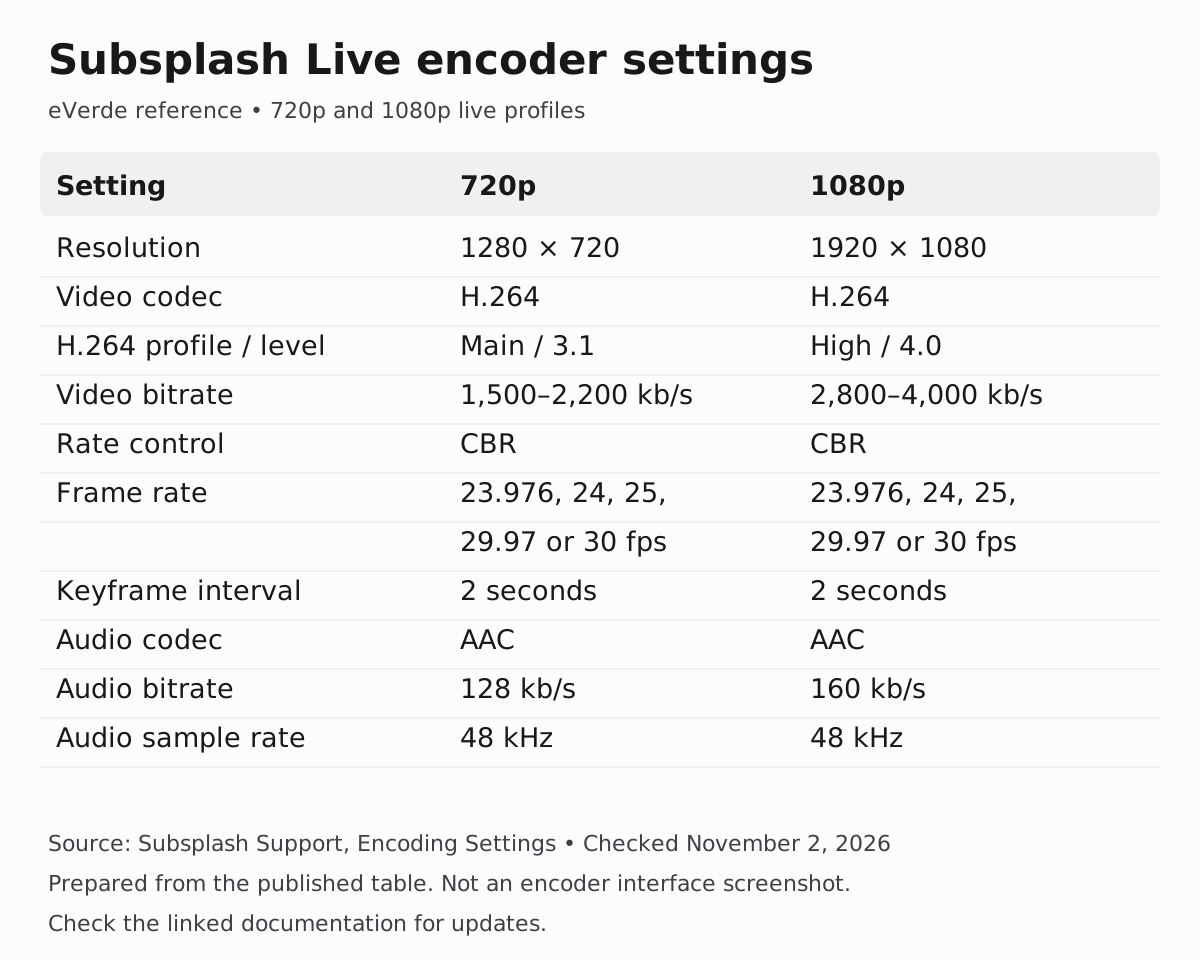
Settings source: Subsplash Support: Encoding Settings. This reference graphic was prepared by ReedVerde from the published table; it is not a screenshot of an encoder interface. Check the linked source for updates.
| Setting | 720p | 1080p |
|---|---|---|
| Resolution | 1280 × 720 | 1920 × 1080 |
| Video codec | H.264 | H.264 |
| H.264 profile / level | Main / 3.1 | High / 4.0 |
| Video bitrate | 1,500 to 2,200 kb/s | 2,800 to 4,000 kb/s |
| Rate control | CBR | CBR |
| Frame rate | 23.976, 24, 25, 29.97, or 30 fps | 23.976, 24, 25, 29.97, or 30 fps |
| Keyframe interval | 2 seconds | 2 seconds |
| Audio codec | AAC | AAC |
| Audio bitrate | 128 kb/s | 160 kb/s |
| Audio sample rate | 48 kHz | 48 kHz |
A higher bitrate is not automatically better. Subsplash identifies network capacity as a possible bottleneck and recommends considering 720p when bandwidth is constrained. Match the output to a connection that can sustain it.
A healthy signal still needs a correctly scheduled broadcast
There is another connection to inspect: the relationship between your live feed and your scheduled event.
Subsplash requires both a scheduled broadcast and an active encoder feed. It enforces the scheduled start time, so sending video early does not make the public broadcast begin early. The scheduling guide notes exceptions: syndication may begin up to two minutes early, and some TV apps may show the feed as soon as it starts. Its guidance is to start the encoder at the scheduled start or up to two minutes before it. Starting much earlier can add unwanted preservice material to the recording.
For a service beginning at 10:00, a practical test would be to schedule the broadcast for 9:55, start the encoder between 9:53 and 9:55, and send a welcome slide or countdown before worship. Check the actual upcoming event and its time zone, including when using a repeating template.
Read Scheduling and Running a Live Stream for the matching and timing details. Test your chosen routine before relying on it on Sunday.
Why might YouTube start four or five minutes late?
Starting your encoder early does not bypass that scheduled start. YouTube syndication then adds another handoff.
Subsplash says it attempts the YouTube start within two minutes after whichever occurs later: the scheduled start or the encoder feed starting. If unsuccessful, it retries at two-minute intervals for up to fifteen minutes.
That behavior is one possible explanation for a delayed start. It is not enough to diagnose a particular church’s problem.
During a test, record when the encoder starts, when Subsplash receives video, when playback becomes available in the app or website, and when YouTube becomes watchable. Confirm YouTube syndication is enabled and connected to the intended channel. Follow the Subsplash YouTube Syndication guide if the connection needs troubleshooting.
Also distinguish a broadcast that begins late from a broadcast that is already playing but runs behind the room. Those symptoms need different investigations.
Give your volunteers a repeatable Sunday routine
Do the detailed configuration work before Sunday. Use a focused Subsplash staff training session to make the routine familiar. Then give the team a short operating checklist:
1. Confirm the upcoming event, time zone, and destinations.
2. Check the picture and audio before the encoder.
3. Confirm the saved encoder output preset.
4. Start the feed at the documented time.
5. Verify actual playback and sound in the app, website, and YouTube.
6. Record any error and its time before changing settings.
Change one variable at a time during troubleshooting. Keep a record of the working setup so the next volunteer does not have to reconstruct it.
If the problem remains, send support the event details, equipment and software versions, encoder settings, timestamps, errors, and which destinations were affected. That gives them a specific failure to investigate.
Build a system your team can trust
Recurring setup mistakes are a reason to improve the system and documentation. Volunteers should not have to guess which setting changed or whether an encoder’s green light means viewers can hear the service.
Start with the plumbing. Trace every connection. Verify the final output entering Subsplash. Then test the schedule and every destination. When planning the recording workflow, see how we create live and sermon-only versions each week.
ReedVerde is independent and not affiliated with Subsplash Inc.
Frequently asked questions
Does every camera and streaming device need identical settings?
No. Each connection needs compatible formats, and any conversion must be supported and intentional. The final encoded feed should follow Subsplash’s live recommendations.
Why is my encoder streaming but YouTube is not live?
Check whether Subsplash is receiving the feed, whether the scheduled broadcast has begun, and whether YouTube syndication is enabled and connected. Use timestamps to identify the delayed handoff.
Does starting the encoder earlier fix a delayed stream?
Not by itself. Subsplash enforces the event start time. Coordinate the event and encoder timing, then verify each viewing destination before the service starts.
Should I use the highest bitrate my encoder supports?
Use the profile recommended for the destination and a bitrate your connection can sustain. Increasing bitrate can make a capacity problem worse.

Read More
Streamlined Sundays: How We Create Live and Sermon-Only Versions Each Week
Every Sunday has two stories — the one that happens live and the one that lives online. Learn the exact process we use each week to create both a full live stream and a sermon-only version that keeps your media clear, consistent, and sustainable.
Read more
How to Train Your Staff on Subsplash in One Session
You do not need a 6-week training program. You need one focused session, a documented workflow, and a governance structure that tells people who does what and when.
Read more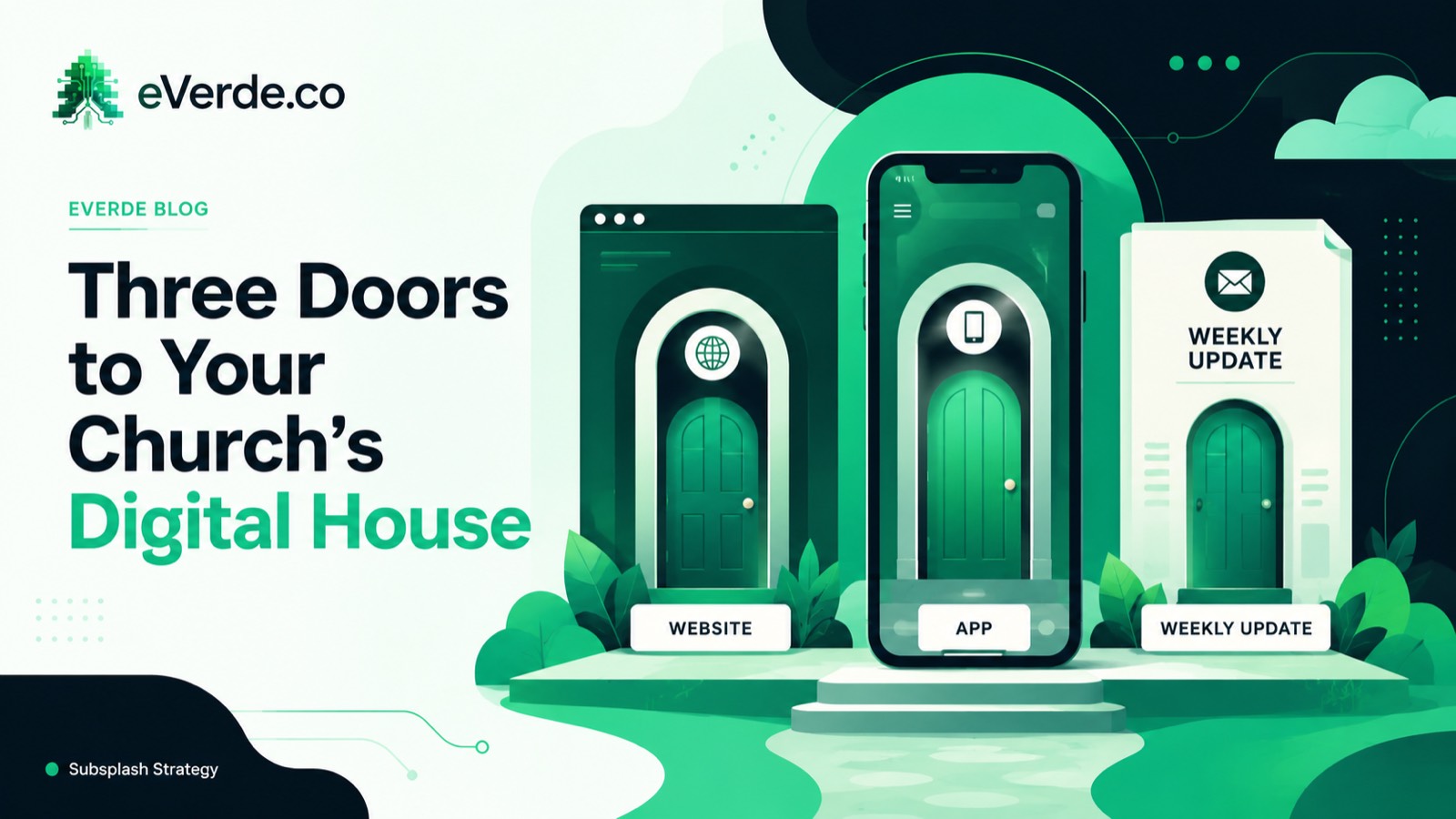
Three Doors to Your Church's Digital House
Your church has three digital doors. Each one serves a different person at a different stage, and most churches treat them all the same. That is why nothing works as well as it should.
Read moreAbout Reed Verdesoto
I'm Reed Verdesoto, an independent Subsplash architect. I've built custom apps, websites, and communication systems for 500+ churches, ministries, and organizations, and I help teams turn a scattered digital presence into one that actually works and keeps working.
If something on your setup feels broken, disconnected, or harder than it should be, reach out. I'd rather have a real conversation about what you're dealing with than sell you a package.
Get in touchOriginally published on reedverde.com