
The Church Calendar That Plans Itself: One Annual Map, Rolling 90 Days at a Time
 Reed VerdesotoDigital Systems Architect
Most churches build their calendar two weeks before they need it. Easter is three Sundays out and someone finally asks who is booking the sunrise service. The summer worship night gets planned in June, after half the church has already left on vacation. The Christmas concert comes together in a panic every single December, as if it were a surprise.
It is not a surprise. You have Easter every year. You have Advent every year. Summer changes your rhythm every year, whether it grows or shrinks. None of this should catch you off guard. The scramble is not a planning problem. It is a system problem, and it is fixable.
Here is the system I set up for churches. It has two layers. The first is a map you draw once a year. The second is a cycle that runs every 90 days and never stops. Together they let you build a whole season before it arrives, so the season you are living in was finished months ago and the season coming next is already underway.
Layer One: The Annual Map
Once a year, you sit down with the entire calendar in front of you. Not one quarter. The whole thing. This is where you place the big rocks.
The big rocks are the things you already know are coming because you do them every year. Easter. Advent and the Christmas season. The summer shift, where your attendance and your programming change. Whatever your denomination runs on a fixed yearly rhythm. You know these exist. You do not need to invent them. You just need to put them on the map.
As you place them, sort them by how often they happen. Some events happen once a year, like your Christmas concert or your big outreach weekend. Some happen once a quarter. Some happen once a month. Some happen every single week, like your Bible studies and your worship services. And a few happen a handful of times a year on no fixed schedule. Getting every event sorted into one of these tiers is the point. It tells each quarter what it is supposed to be building before the quarter even starts.
You will not know every detail yet, and that is fine. During the annual planning, you might not know which exact week you will hold the summer worship night. You might not know which night the Christmas concert lands on. You just know they are happening, because you do them every year. Easter moves around the calendar, and when it moves it can bump something that normally sits in that week. The annual map holds space for that. It is a map, not a locked schedule.
The last thing you do on the annual map is check your balance. Run your whole year through five questions. Across the year, are you offering enough Worship, enough opportunities to Grow, enough ways to Share the faith, enough places to Serve, and enough moments to Connect? If your entire calendar is worship nights and outreach events but nothing that helps people actually grow, you will see it here, on the map, a year out, while you can still fix it. This same five-part check comes back every quarter at smaller scale. The annual map is where you catch the imbalance early.
Layer Two: The Rolling 90-Day Cycle
The annual map tells you what is coming. The 90-day cycle is how you build it. And here is the promise that makes it work: your season page is live a full month before the season starts. Nobody is ever caught off guard by something happening on day one, because the whole season was published thirty days early.
There are four seasons, and each one is three months. Spring is March, April, and May, anchored by Easter. Summer is June, July, and August, defined by the attendance shift. Fall is September, October, and November, ending with Thanksgiving. Winter is December, January, and February, starting with Advent.
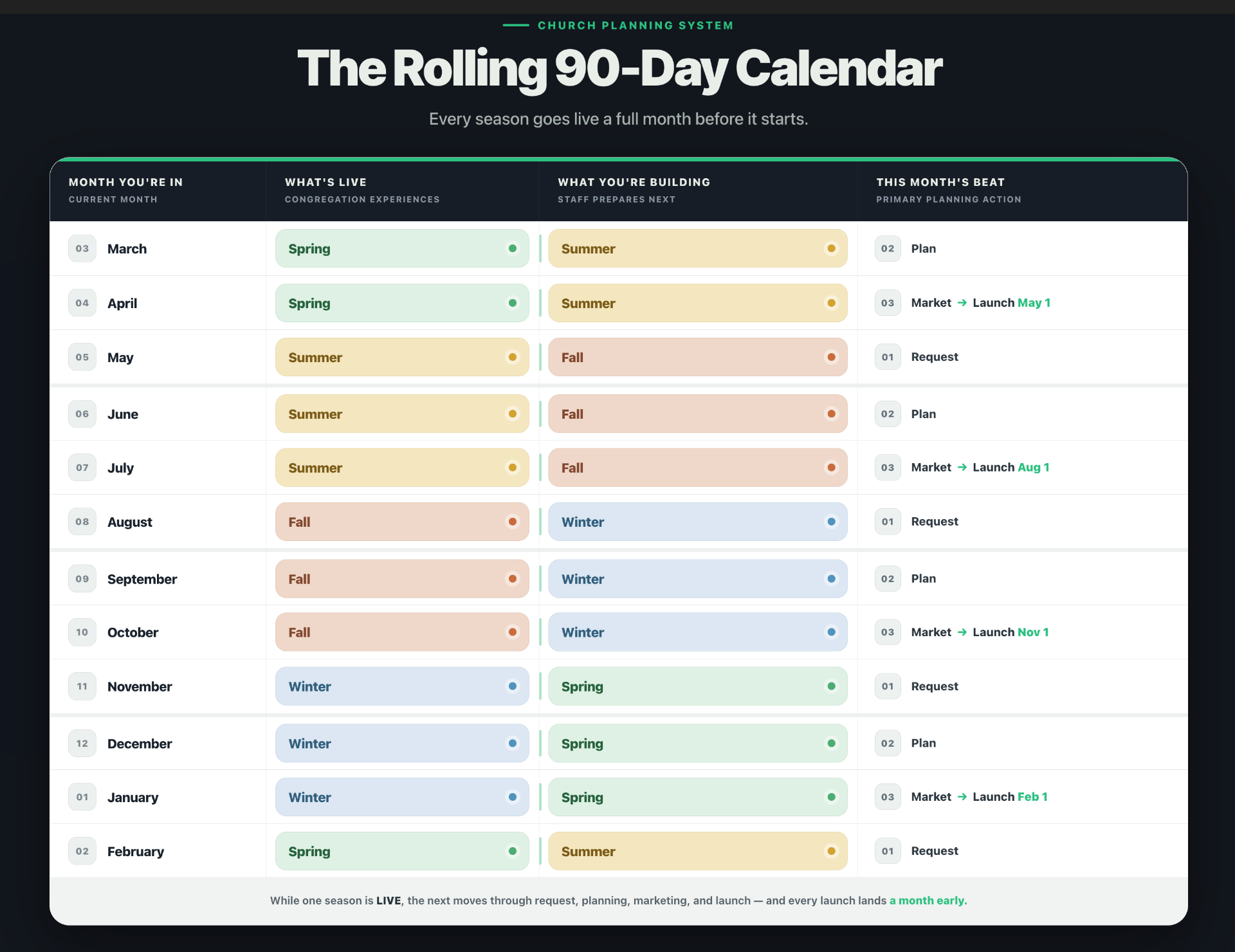
Watch how one cycle runs. Take fall, which covers September, October, and November. You do not start building fall in the fall. You do not even start in the summer. You start in May. Through May, your team submits every event they are planning for fall: names, dates, and audiences, all sent in for approval. Through June, every approved event gets planned and booked for real, rooms reserved, registrations set up, logistics locked. Through July, the communications team builds the marketing. Then on August 1, the fall season page goes live, a full month before fall actually begins on September 1.
That month of lead time is the whole point. Anything happening the first week of September has been public since August 1. People can plan around it. Registrations are already open. Nothing lands cold.
That is why it is called rolling. Each season gets its own clean three-month build, and the page launches a month before the season arrives. There is no overlap, because no two seasons are ever being built in the same month. Your team works one full build ahead of what the congregation is living in, and always finishes early. That is what makes it calm instead of chaotic. Your church stops scrambling before Easter because Easter went live a month before Lent even ended.
Here is the whole year at a glance. Fall is built in May, June, and July, and launches August 1. Winter is built in August, September, and October, and launches November 1. Spring is built in November, December, and January, and launches February 1. Summer is built in February, March, and April, and launches May 1. Every launch date sits one month before the season it serves, and the rhythm never stops: a page goes live on the first of August, November, February, and May, all year, every year.
The Four Beats: Request, Plan, Market, Launch
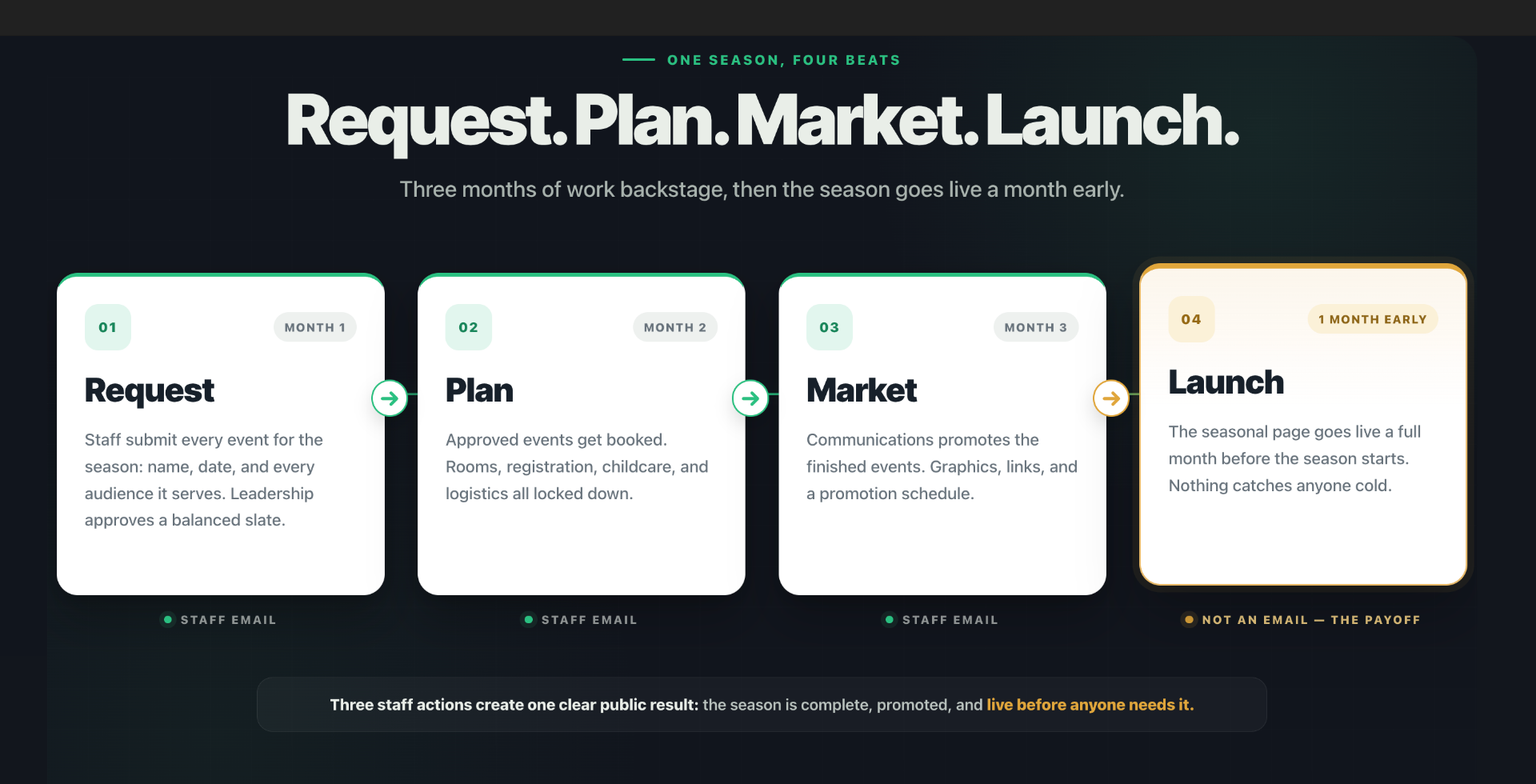
Every 90-day cycle has four beats. The first three are things you ask your staff to do. The fourth is the payoff they all drive toward.
Request. In the first 30 days, your team submits every event they are planning for the next season: the name, the date, and every audience it serves. Leadership reviews the whole slate together and approves a balanced season. More on why this approval step matters in a moment.
Plan. In the second 30 days, every approved event gets made real. Rooms booked. Registration set up. Childcare, costs, and logistics locked down. Nothing is left loose.
Market. In the third 30 days, communications takes those finished events and promotes them. Graphics, descriptions, links, and a promotion schedule.
Launch. A full month before the new season starts, the seasonal landing page goes live and promotion begins. This is the beat everyone can see. The first three beats happen backstage, inside your staff. Launch is the moment the whole church experiences the result, and it happens early on purpose, so nothing in the new season ever catches anyone cold.
Notice that only the first three beats are staff emails, because those are the three times you ask someone to do something. Launch is not an email. Launch is the deadline every one of those emails counts down to. It is the day the work becomes visible.
When an Event Won't Fit the Cycle
The 90-day cycle is your default rhythm. Most events fit it cleanly. A few will not, and pretending they do is how good systems fail. There are two exceptions to plan for.
The first is small, and the month-early launch already mostly solves it. Because your season page goes live a full month before the season starts, an event in the first week of the season has had thirty days of runway. But say something lands on the very first day and you want even more lead time. You can pull that launch a few days earlier still, or tag that opening event onto the end of the previous season's page so it gets promoted sooner. The season boundaries exist to serve your events. When an event sits right on the seam, bend the boundary, do not jam the event through it.
The second is bigger, and it is the one that breaks the rhythm entirely. Some events need far more lead time than a single build cycle gives them. A summer mission trip is the classic example. The trip happens in June, July, or August, so the cycle says build it in the winter and spring before. But signups, fundraising, passports, and training might need to start even earlier than that. That event does not obey the 90-day rhythm at all, and if you force it into the normal cycle you will open registration months too late.
The fix is not to abandon the cycle. It is to pull the long-lead events out of it and plan them on their own timeline. And the place you catch them is the annual map. When you sit down once a year and place the big rocks, that is when you flag the mission trip and work backward: the trip is in July, signups must open in January, so the promotion for it starts in the winter season even though the trip itself lives in summer. The annual map is what makes this possible, because you are looking at the whole year at once and can plan backward from any date to the runway it actually needs.
So keep the rhythm as your default, and keep a short list of exceptions. Anything with a long runway, a mission trip, a big conference, a camp with early-bird deadlines, gets planned backward from its real date, not from the season it happens in. The cycle handles the ninety percent. The annual map handles the rest.
The Approval Gate
The Request beat is not really about collecting names and dates. It is about approval. This is the part most churches skip, and it is the part that keeps your calendar healthy.
When every ministry submits its proposed events for the season, leadership reviews the whole slate at once, before anyone books a room. This is where you catch the balance problem at quarter scale. Maybe you have four outreach events and nothing that helps people grow. Maybe every event is aimed at adults and nothing at students. You see it here, at request time, while it costs nothing to fix. Leadership approves a well-rounded season, then planning begins.
What defines the four beats is not how much information each one collects. It is the gate at the end of each. Request ends when leadership approves the season. Plan ends when everything is booked and locked. Market ends when it is all promoted. Launch is the season page going live.
The cleanest way to run the Request beat is a single event request form that every event flows through. One church I work with uses exactly this. Their form opens by telling the person that every event begins here, and that once submitted it gets reviewed by leadership for mission alignment, ministry coordination, and calendar availability, then moves from review to approval to publication. The submitter even signs an acknowledgment that their request will be reviewed for alignment with the mission, purpose, and season of ministry.
The form captures what leadership needs to make the call: the event title, who is responsible for it, a short description including why a person would benefit from it, expected attendance, and the date and time. It also captures logistics that save everyone a second round of questions later, like which rooms are needed, setup and cleanup time, whether nursery care is required and for how many children, accessibility needs, and equipment. If you can gather all of that at request time, you are ahead. But the gate is still approval. A complete form does not skip the review. It just makes the review faster.
The Launch: Your Seasonal Landing Page
Launch day is not just a date. It is a page going live. And that page is one of the most useful things your church can build.
A seasonal landing page is a single page that holds an entire season in one place. Your Advent page. Your Easter page. Your summer page. Instead of scattering Christmas events across a dozen ministry pages where people have to hunt for them, you gather the whole season onto one page built for that moment. Someone lands on it and sees everything happening, in order, with a clear way to sign up for each piece.
I build these for Advent, for Easter, and for summer as a matter of course. Advent and Easter almost demand one, because they carry so many moving pieces in a short window: services, concerts, outreach, family events, all stacked into a few weeks. Summer earns one because the rhythm changes so much that people genuinely do not know what is still happening. Fall does not always need its own page, but for some churches it helps, especially if you launch a ministry year in the fall.
What makes a good seasonal landing page? It leads with the one thing that matters most this season. For Advent, that is probably your Christmas Eve services. For Easter, your Easter Sunday times. Everything else supports that headline. It lists every event in the season in a clear order, usually by date, each with its own clear next step, a button to register or learn more, never a dead end. It pulls from your calendar automatically wherever your setup allows, so the page is not one more thing to update by hand. And it has a life span. A seasonal page is not permanent. It goes up before the season, it carries the season, and it comes down or gets archived after. That is a feature, not a flaw. It lets the page be sharply focused on one moment instead of trying to serve everyone forever.
The seasonal landing page is the visible reward for the whole 90-day cycle. It is what the congregation actually touches. Everything upstream, the request, the approval, the planning, the marketing, exists so that on launch day this page is complete, accurate, and ready.
The Two Rules That Make It Real
A calendar is only as good as what goes on it and how it is tagged. Two rules decide both.
Rule one: if you sponsor it, it goes on the calendar. The test is simple. Wherever two or more are gathered under your church's name, that is an event, and it belongs on your calendar. If your church sponsors it, if your name is on it, it goes on. The open gym where members play basketball on Tuesday nights and anybody is welcome, that goes on. Every prayer meeting. Every elder meeting. Every small group. All of it. The only things that stay off are events you are merely hosting for someone else. A private party, a wedding, a baby shower, an outside organization renting your space. If they are just renting the room and your church is not part of it, it does not belong on your public calendar. The line is sponsorship, not location. It is not about whether it happens in your building. It is about whether your church is behind it.
Rule two: tag every event to every audience it serves, not to the ministry that runs it. This is the one churches get wrong most often, and it is the one that feeds everything else. When you tag an event, do not tag it to the ministry that owns it. Tag it to every audience in your church who would actually use it. Take Celebrate Recovery. It is run by one ministry, but who is it for? Young adults, adults, senior adults, and your recovery community. So it gets tagged to all four. Take Financial Peace. Tag it to adults, young adults, and seniors, and probably your recovery community too, because plenty of people are recovering financially and need exactly this. Take a Parents' Night Out run by the children's ministry. It belongs on every adult page and on the children's page, because the people who need it are parents.
Think about a grocery store. There is no Nabisco aisle. There is no single-brand aisle for one company's products. There is a crackers and snacks aisle, and there is a condiments aisle, organized by what the shopper is looking for. Your events work the same way. If you offer something that fits a certain audience, your job is to put it in front of that audience, next to the other things like it, so they find it where they are already looking. It is not the visitor's job to stumble onto the right ministry page and discover an event applies to them. It is your church's job to steward that information to the people it serves.
Why This Feeds Your Subsplash Setup
Here is the payoff, and it is the reason the whole workflow is worth the discipline. When you document every event in Subsplash and tag it correctly to every audience it serves, you only do that work once. Tag it right one time, and it populates automatically onto every audience page and into your app. The children's page fills itself. The adults page fills itself. The recovery page fills itself. Your seasonal landing page pulls from the same source. Nothing gets entered twice, and nothing gets forgotten on a page where the people who need it are actually looking.
That is what makes an auto-populating system actually deliver. The technology can move an event onto every page it belongs on, but only if a human tagged it to those audiences in the first place. The 90-day calendar process is the human half of that. The system does the distribution. Your workflow does the tagging. Together they mean an event gets requested once, approved once, tagged once, and then shows up everywhere it should, for everyone it is for, without anyone touching it again.
That is a calendar that plans itself. One map a year, one cycle every 90 days, four beats that never change, feeding a system built to carry the rest.
Want the Templates?
I built a free set of email templates that runs this whole system for you. Twelve ready-to-send staff emails, three per season, that walk your team through Request, Plan, and Market and count down to every Launch. Copy them, fill in your dates and links, and schedule them. It comes with a short guide for scheduling recurring sends in Gmail or Office 365. Fill out the form below and both files will appear right on the page for you to download.
Want It Built For You?
The templates run the system. But setting it up right, the tagging, the audience structure, the seasonal landing pages, the calendar that actually auto-populates, is the part most churches never quite finish on their own. That is what I do. I am an independent Subsplash architect. I help churches build the structure underneath all of this: the audience-based pages, the tagging system, the seasonal landing pages, and the long-term rhythm that keeps it from drifting or falling apart after launch. Not a one-time setup you are left to maintain alone, but a system built to keep working. If your church calendar feels like a scramble every season, or if your app and website never seem to show the right things to the right people, let's talk about building the system that fixes it for good.
Want a second set of eyes on how this calendar fits your church's rhythm? Start with an Exploration call.

Read More
Automate Your Church Event Process with Subsplash Forms and Workflows
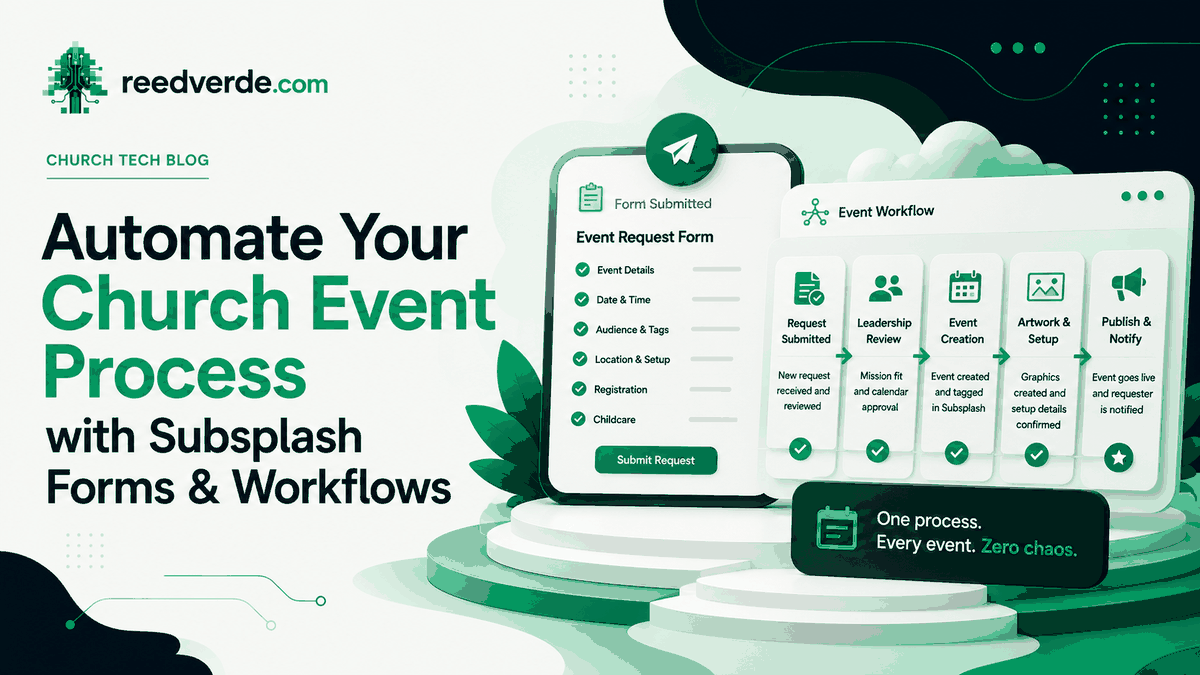
Yesterday I showed you how to plan your church calendar 90 days out. Here is how you automate the process once you have the information: one Subsplash Form, one Workflow board, and emails that send themselves.
Read more
Audience Tags vs. Event Categories in Subsplash: When to Use Which
Tags and categories look similar in the dashboard. They do completely different things. Using them wrong creates invisible mess that costs your team hours every week.
Read more
The Digital Weekly Update: Why Every Subsplash Church Needs One
Here is a trick question: when does a paper bulletin go out of date? The answer is when you hit print. When does an email go out of date? When you hit send. A digital weekly update never goes out of date as long as you update it.
Read moreAbout Reed Verdesoto
I'm Reed Verdesoto, an independent Subsplash architect. I've built custom apps, websites, and communication systems for 500+ churches, ministries, and organizations, and I help teams turn a scattered digital presence into one that actually works and keeps working.
If something on your setup feels broken, disconnected, or harder than it should be, reach out. I'd rather have a real conversation about what you're dealing with than sell you a package.
Get in touchOriginally published on reedverde.com